
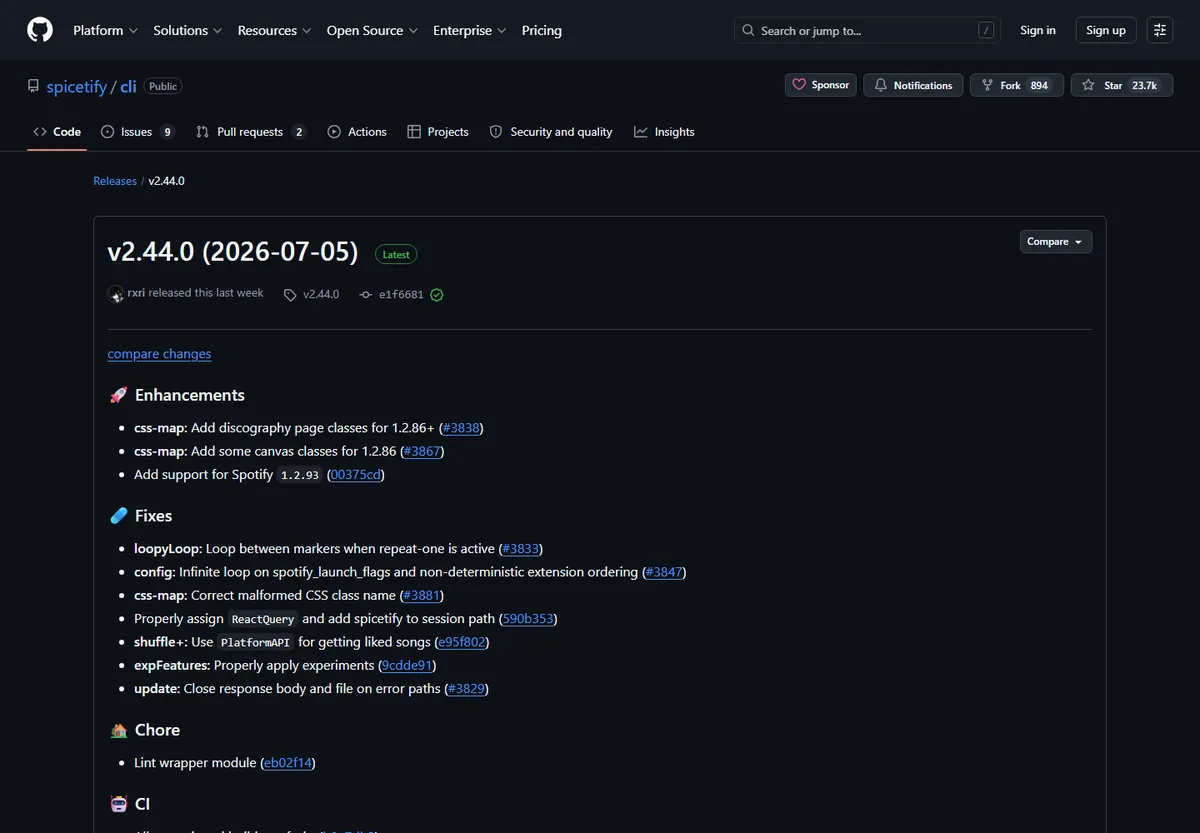
The only legitimate source for precompiled Spicetify executable binaries is the official GitHub Releases page hosted at https://github.com/spicetify/cli/releases. Spicetify does not distribute installer wizards, MSI packages, or standalone EXE setup bundles through random file-sharing mirrors or third-party download portals.
For automated installation, the official PowerShell and Bash scripts automatically query the GitHub API to fetch the matching asset for your computer. If you prefer manual installation or work behind an offline firewall, download the exact ZIP or TAR.GZ archive for your architecture, extract the spicetify binary to your system PATH, and initialize your Spotify desktop client.
Official GitHub Repository vs Third-Party Download Mirrors
Why downloading directly from the official spicetify/cli repository is essential for security and software integrity.
Spicetify is an open-source command-line tool designed to customize the official Spotify desktop client with CSS themes, user extensions, and custom applications. Because Spicetify injects custom scripts directly into the desktop client bundle, downloading the authentic binary from the verified upstream source is essential for system security.
The official Spicetify project is strictly developed under the GitHub organization 'spicetify', with its core repository located at github.com/spicetify/cli. The community never charges fees, distributes closed-source setup bundles, or packages adware.
When obtaining Spicetify, verify that your browser URL points specifically to github.com/spicetify/cli/releases. Never download from third-party aggregators or re-upload mirrors that bundle unauthorized executables.
The Spicetify development team never packages the CLI as an EXE installer or bundled package with Spotify. Any website offering a 'Spicetify All-in-One Installer.exe' or 'Spotify Premium Free with Spicetify.exe' is illegitimate and potentially malicious.
Spicetify GitHub Release Assets Matrix (v2.45.1)
Choose the exact binary asset corresponding to your operating system and CPU architecture.
Each tagged GitHub release includes precompiled standalone binaries packaged into compressed archives for all major operating systems. You do not need to compile Go source code manually.
For 64-bit modern Windows PCs running Intel or AMD processors, select the windows-x64.zip archive. Newer Windows laptops powered by Snapdragon processors should download the windows-arm64.zip package instead.
On macOS, Apple Silicon devices (M1, M2, M3, M4) require darwin-arm64.tar.gz, while older Intel Macs use darwin-x64.tar.gz. Linux distributions provide x64 and arm64 tarballs matching your architecture.
| Platform & Architecture | Release Asset Name | Format | File Size | Target Hardware |
|---|---|---|---|---|
| Windows 64-bit (Intel/AMD) | spicetify-2.45.1-windows-x64.zip | .zip | 7.26 MB | Standard Windows 10 & 11 PCs |
| Windows ARM64 | spicetify-2.45.1-windows-arm64.zip | .zip | 6.76 MB | Snapdragon X Elite, Surface Pro ARM |
| Windows 32-bit (Legacy) | spicetify-2.45.1-windows-x32.zip | .zip | 7.30 MB | Legacy 32-bit Windows systems |
| macOS Apple Silicon (M1-M4) | spicetify-2.45.1-darwin-arm64.tar.gz | .tar.gz | 6.78 MB | MacBook, Mac mini, iMac with Apple Silicon |
| macOS Intel (x86_64) | spicetify-2.45.1-darwin-amd64.tar.gz | .tar.gz | 7.13 MB | Older Intel-based Apple Macs |
| Linux 64-bit (x86_64) | spicetify-2.45.1-linux-amd64.tar.gz | .tar.gz | 7.08 MB | Ubuntu, Debian, Fedora, Arch, Zorin |
Automated Install Script vs Direct GitHub Binary Download
Compare the standard automated install commands with manual GitHub binary placement.
While direct GitHub archive downloads provide maximum control for offline workstations, the official automated script is recommended for most users because it configures the system PATH automatically.
Manual GitHub binary download requires you to create the directory, extract the executable, and register environment variables manually. This process takes 3 to 5 minutes.
If you are installing Spicetify for the first time on a standard computer, automated shell installation remains the fastest approach with fewer configuration hurdles.
iwr -useb https://raw.githubusercontent.com/spicetify/cli/main/install.ps1 | iex
Step-by-Step: Manual GitHub Binary Installation
Follow these detailed instructions if you prefer downloading and configuring the GitHub release archive manually.
For developers or users operating under restricted network environments, follow these manual installation steps using official GitHub assets.
Ensure your Spotify desktop client is installed from spotify.com before proceeding.
- 1
Download the Official Archive
- 2
Extract the Archive to User AppData
- 3
Add Spicetify to System PATH
- 4
Verify Binary Execution in Terminal
- 5
Generate Baseline Backup and Apply
Verifying Checksums and Asset Authenticity
How to verify that your downloaded GitHub release archive has not been corrupted or tampered with.
Cryptographic hash verification guarantees that your downloaded archive is authentic and untampered.
To check SHA256 checksums on Windows, run 'Get-FileHash .\spicetify-*-windows-x64.zip -Algorithm SHA256' in PowerShell.
Compare the generated 64-character hash against the published checksums on the release page before extracting.
Get-FileHash -Path .\spicetify-2.45.1-windows-x64.zip -Algorithm SHA256
Handling GitHub API Rate Limits and Proxy Issues
Diagnose common network issues when accessing GitHub Releases or installer scripts.
Automated installer scripts make unauthenticated requests to GitHub REST API endpoints, which are limited to 60 requests per hour per IP address.
When rate limits trigger, scripts display 'API rate limit exceeded'. The direct download link on GitHub web avoids this limitation entirely.
Users behind strict firewalls can configure an HTTPS proxy or download the release assets through their browser.
- Rate Limit Error (HTTP 403): Occurs on shared networks; resolve by downloading the binary manually from the GitHub release page.
- TLS / SSL Handshake Failure: Check system clock synchronization or configure proxy certificates if operating on enterprise networks.
- Raw GitHub User Content Blocked: In regions where raw.githubusercontent.com is blocked, use direct GitHub Releases download or local manual extraction.
- Command Not Found after Extraction: Ensure the extraction directory has been appended to your system User PATH environment variable.
How to Update Spicetify When New GitHub Releases Drop
Maintain your CLI installation and keep in sync with new Spotify desktop updates.
New Spicetify releases drop whenever Spotify updates its desktop client or when new extension features are introduced.
Automated script users can run 'spicetify upgrade' directly in their terminal to fetch the latest binary.
Manual users can replace the spicetify executable in their installation directory with the newer binary from GitHub.
spicetify upgrade
Frequently Asked Questions About Spicetify GitHub Downloads
Is github.com/spicetify/cli the only official GitHub repository?
Yes. The official codebase, issue tracker, and release binaries are hosted exclusively at github.com/spicetify/cli.
Why is Spicetify distributed on GitHub instead of app stores?
Spicetify is an open-source command-line tool that modifies local Spotify application files, which app store sandboxes do not permit.
Does downloading Spicetify from GitHub download Spotify songs?
No. Spicetify only customizes client UI and injects extensions. It does not download music or bypass DRM.
How do I choose between x64 and ARM64 on Windows?
Most Windows PCs with Intel or AMD processors use x64. Only Qualcomm Snapdragon laptops require ARM64.
Can I download older versions of Spicetify from GitHub?
Yes. All previous releases remain archived under the GitHub Releases tab for rollbacks.
What should I do if GitHub raw.githubusercontent.com times out?
Download the release ZIP directly through your web browser and follow manual installation.
Official sources used
- Spicetify CLI GitHub Repository — Official open-source repository containing source code, documentation, and issues.
- Spicetify GitHub Releases — Direct download portal for precompiled multiplatform standalone release archives.
- Official Spicetify Documentation — Official installation, customization, and troubleshooting guide.